
When it comes to building and managing a successful online presence, understanding WordPress web design best practices is not just beneficial—it’s essential. Did you know that approximately 40% of all websites on the internet are powered by WordPress? With such a vast number of users, it’s clear that a well-designed website can make a significant impact on your business’s success.
Whether you are a novice or an experienced web developer, embracing the best practices in WordPress web design can enhance user experience, improve search engine rankings, and ultimately lead to higher conversions. In this blog post, we will explore the key principles and strategies that will help you create a compelling and effective WordPress website tailored to meet the needs of your audience.
Understanding the Importance of WordPress Web Design Best Practices
Creating a website using WordPress is a great start, but ensuring that your design adheres to the WordPress web design best practices is crucial for success. Implementing these practices can significantly enhance user experience and improve your site’s visibility in search engines.
Impact on User Experience
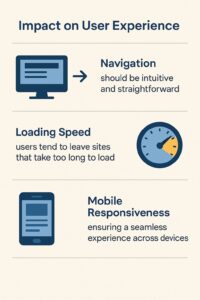
A well-designed website captivates visitors and encourages them to stay longer. Key factors influencing user experience include:
- Navigation, which should be intuitive and straightforward.
- Loading speed, as users tend to leave sites that take too long to load.
- Mobile responsiveness, ensuring a seamless experience across devices.
Role in SEO
Applying the best practices for WordPress web design not only improves user engagement but also enhances your site’s SEO performance. Search engines reward well-structured, user-friendly websites, which can lead to higher rankings. Important SEO tactics include:
- Optimizing images for faster loading.
- Using SEO-friendly URLs that are clear and concise.
- Incorporating keywords naturally throughout your content.
By focusing on these areas, you are likely to see increased organic traffic to your site.

Choosing the Right Theme
Selecting a suitable theme is one of the first steps in adhering to WordPress web design best practices. Consider the following when making your choice:
- Responsiveness: Ensure your theme is mobile-friendly.
- Customizability: Look for themes that allow you to tweak layouts and styles easily.
- Plugin compatibility: Verify that popular plugins work seamlessly with your theme.
Utilizing a robust theme can save time and effort down the line, allowing for easier updates and maintenance.
For more insights on choosing effective themes, you can refer to ThemeForest.
Prioritizing Mobile Optimization
With more than half of internet traffic coming from mobile devices, mobile optimization is a cornerstone of effective web design.
Statistics on Mobile Usage
- Over 50% of web traffic globally comes from mobile devices.
- Mobile users are less patient and expect a seamless experience.
Techniques for Mobile-Friendly Design
- Use responsive design frameworks to automatically adjust layouts.
- Optimize images for faster load times on mobile networks.
- Consider touch targets for clickable elements, ensuring they are easy to tap.
Following these guidelines will help create a mobile experience that meets user expectations and aligns with WordPress web design best practices.
Creating a User-Centric Navigation
A well-structured navigation system is vital in implementing WordPress web design best practices. Users should be able to find the information they need promptly and efficiently, which enhances their overall experience.
Importance of Intuitive Navigation
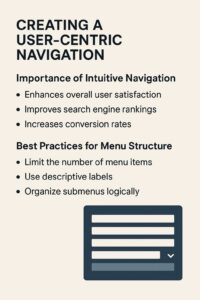
When visitors arrive at your site, they should have a clear path to explore your content. Effective navigation helps reduce bounce rates and encourages users to engage more with your offerings. Here’s why intuitive navigation is essential:
- Enhances overall user satisfaction: Clear pathways help users find what they’re looking for without frustration.
- Improves search engine rankings: Well-organized sites are easier for search engines to crawl and index.
- Increases conversion rates: Simplified navigation can lead to higher sales or sign-up rates.
Best Practices for Menu Structure
To establish an effective menu, consider the following best practices:
- Limit the number of menu items: Aim for clear, actionable categories.
- Use descriptive labels: Ensure titles reflect the content of the pages.
- Organize submenus logically: Group related topics under relevant parent categories.
Utilizing Breadcrumbs
Breadcrumb navigation provides users with a trail back to their previous steps, improving usability and SEO. Benefits include:
- Better user experience: Users can easily backtrack without using the browser’s back button.
- Enhanced SEO: Search engines appreciate breadcrumbs as they provide additional structure to your site.
By focusing on these elements, you can create a user-centric navigation system that aligns with WordPress web design best practices. For further guidance on web navigation, visit Google’s Web Fundamentals.
Optimizing Site Speed
One of the most critical WordPress web design best practices is ensuring your website loads quickly. Users expect instant access to content, and a slow website can lead to high bounce rates. Here’s how to optimize site speed effectively.
Why Speed Matters
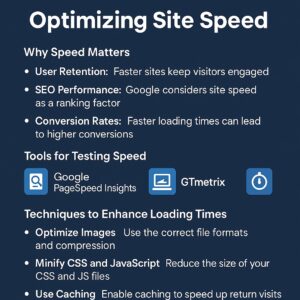
- User retention: Faster sites keep visitors engaged and decrease the likelihood of abandonment.
- SEO performance: Google considers site speed as a ranking factor. A faster website can lead to better search engine visibility.
- Conversion rates: Studies show that even a one-second delay can reduce conversion rates significantly.
Tools for Testing Speed
There are several tools available to analyze and improve your site speed:
- Google PageSpeed Insights: Provides insights into how well your site performs on both mobile and desktop, along with suggestions for improvement.
- GTmetrix: Offers detailed reports on site speed and performance, along with suggestions for optimization.
- Pingdom: Allows you to test your site’s speed from multiple locations around the globe.
Techniques to Enhance Loading Times
Implement the following techniques to maximize your site’s speed:
- Optimize images: Use the correct file formats (like JPEG for photos and PNG for graphics) and compress images without sacrificing quality.
- Minify CSS and JavaScript: Remove unnecessary characters from your files to reduce file sizes and improve loading speeds.
- Use caching: Implement caching solutions (like WP Super Cache or W3 Total Cache) to store static versions of your web pages, reducing load times for repeat visitors.
- Choose a reliable hosting provider: Quality hosting can significantly impact site speed. Look for companies that offer optimized WordPress hosting.
By prioritizing site speed and employing these optimizations, you align your website with WordPress web design best practices, effectively enhancing user experience and SEO performance. For more exhaustive performance tips, visit Akamai.
Implementing Effective SEO Strategies
Incorporating effective SEO strategies is a vital aspect of following WordPress web design best practices. A site that is well-optimized for search engines is more likely to attract organic traffic, ultimately leading to higher engagement and conversions.
Importance of On-Page SEO
On-page SEO refers to all the measures that can be taken directly within your website to improve its position in search rankings. Here are some essential factors to consider:
- Keyword usage: Place targeted keywords naturally throughout your content, particularly in headings, subheadings, and the first 100 words.
- Internal linking: Create links between your pages to enhance navigation and distribute page authority throughout your site.
- Meta tags: Craft compelling meta titles and descriptions that accurately represent your page content and include your target keywords.
Tips for SEO-Friendly URLs
URLs should be clean and descriptive for both users and search engines. Follow these guidelines for creating effective URLs:
- Use descriptive keywords: Include relevant keywords to give visitors a hint about the page content.
- Keep it short: Shorter URLs are easier to read and share.
- Avoid special characters: Stick to alphanumeric characters and hyphens to separate words for better readability.
Best Practices for Image Optimization
Images can significantly impact site loading times, which affects SEO. Ensure your images are optimized by following these practices:
- Use appropriate file formats: Choose JPEG for photographs and PNG for graphics with transparency.
- Compress images: Utilize tools like TinyPNG or ImageOptim to reduce file size without losing quality.
- Add alt tags: Use descriptive alt text for images to improve accessibility and provide context for search engines.
By implementing these effective SEO strategies, you will enhance your site’s visibility and align it with WordPress web design best practices. For more detailed insights into SEO optimization, you can refer to Moz.
Utilizing Quality Content
Quality content is the backbone of any successful website, and it plays a pivotal role in adhering to WordPress web design best practices. By providing valuable and informative content, you not only keep your audience engaged but also improve your site’s SEO performance.
Importance of Informative Content
Creating content that serves your audience’s needs is crucial. High-quality content offers numerous benefits:
- Builds authority: Well-researched and informative content positions you as an authority in your field.
- Enhances user experience: Engaging content keeps visitors on your site longer, reducing bounce rates.
- Encourages sharing: Quality content is more likely to be shared on social media, increasing your reach.
Tips for Engaging Blog Posts
To create compelling blog posts that resonate with your audience, consider the following tips:
- Know your audience: Understand their pain points and interests to tailor your content accordingly.
- Craft attention-grabbing headlines: Use compelling titles to attract readers and encourage them to click.
- Use visuals: Incorporate images, infographics, or videos to break up text and provide additional context.
Regular Updates and Freshness
Keeping your content up-to-date is essential for both SEO and user engagement. Consider these practices:
- Review and update old posts: Regularly refresh your existing content to ensure accuracy and relevance.
- Create a content calendar: Plan your content strategy in advance to maintain consistency in posting.
- Engage with current trends: Stay informed about industry trends and incorporate them into your content.
By focusing on quality content and applying these strategies, you can effectively enhance user engagement and comply with WordPress web design best practices. For more content strategy tips, you can check out HubSpot.
Integrating Social Media Effectively
Integrating social media into your WordPress site is another important aspect of WordPress web design best practices. Effective social media integration can boost your online presence, drive traffic to your website, and enhance user engagement.
Benefits of Social Media Integration
Connecting your website with social media platforms provides several advantages:
- Increased visibility: Sharing your content on social media platforms can significantly expand your audience reach.
- Improved user engagement: Social media allows for direct interaction with your audience, fostering a community around your brand.
- Access to valuable insights: Monitoring social media interactions can provide data on user preferences, helping to shape your content strategy.
Best Practices for Adding Social Buttons
To maximize the effectiveness of your social media integration, consider these best practices:
- Select relevant platforms: Focus on social networks where your target audience is most active, such as Facebook, Twitter, LinkedIn, or Instagram.
- Place buttons strategically: Position social sharing buttons above or below your content for easy access, or include a floating sidebar that remains visible as users scroll.
- Use recognizable icons: Choose easily identifiable social media icons to enhance usability and encourage sharing.
Implementing Social Sharing Plugins
Utilizing plugins can simplify the process of integrating social media into your WordPress site. Consider the following popular options:
- Social Warfare: Allows you to customize sharing buttons and monitor share counts.
- AddToAny: Offers a customizable sharing menu that works with numerous platforms.
- ShareThis: Provides easy sharing options and real-time analytics.
By effectively integrating social media into your website, you can engage your audience more effectively and bolster your adherence to WordPress web design best practices. For further insights on social media strategies, visit Buffer.
Focusing on Readability
Readability is a fundamental aspect of WordPress web design best practices. A website that is easy to read and navigate encourages users to stay longer, engage with the content, and return in the future.
Elements of Readability
Several factors contribute to a text’s readability, including:
- Font choice: Selecting appropriate font styles can enhance comprehension.
- Font size: Ensure text is large enough to read on all devices without straining the eyes.
- Line spacing: Adequate spacing between lines can enhance readability and prevent the text from appearing cramped.
Importance of Font Choice and Size
When choosing fonts for your website, consider the following tips:
- Use web-safe fonts: Opt for fonts that are commonly available across various browsers and devices, such as Arial, Roboto, and Verdana.
- Limit font styles: Stick to two or three font styles throughout your site to maintain visual consistency and avoid clutter.
- Choose contrasting colors: Ensure that the text color stands out against the background for easy reading.
Using White Space Effectively
White space, or negative space, plays a crucial role in the overall readability of your website. Here’s how to use it effectively:
- Break up large blocks of text: Use headings, subheadings, and bullet points to segment your content.
- Margins and padding: Ensure sufficient spacing around text and images to create a clean layout.
- Create visual appeal: Use white space to direct attention to important elements, enhancing the user experience.
By prioritizing readability, you not only improve the user experience but also align your site with WordPress web design best practices. For additional tips on enhancing readability, check out Adobe’s typography guide.
Ensuring Website Security
Security is a critical component of WordPress web design best practices. With the increasing number of cyber threats, it’s essential to implement measures that protect your website and its visitors.
Importance of Security in Design
Web security not only safeguards your data but also ensures a trusted experience for your users. Here are some compelling reasons to prioritize website security:
- Protect sensitive information: Safeguarding user data, including payment details and personal information, is crucial for maintaining trust.
- Maintain brand reputation: A security breach can harm your reputation, leading to lost customers and revenue.
- Improve SEO rankings: Search engines prioritize secure sites (HTTPS over HTTP), which can positively affect your rankings.
Best Practices for Securing WordPress Sites
To enhance the security of your WordPress site, consider the following best practices:
- Use strong passwords: Ensure all user accounts, especially admin accounts, have complex passwords and enforce regular updates.
- Install a security plugin: Utilize WordPress security plugins such as Wordfence or Sucuri to add an extra layer of protection.
- Keep WordPress up-to-date: Regularly update your WordPress core, themes, and plugins to patch vulnerabilities.
- Limit login attempts: Configure your site to restrict the number of login attempts to prevent brute force attacks.
Regular Backups
Creating regular backups of your website is a safety net in case of a security breach. Follow these backup practices:
- Choose a reliable backup solution: Use plugins like UpdraftPlus or BackupBuddy to automate the backup process.
- Store backups off-site: Keep copies of your backups in secure locations such as cloud storage or external drives.
- Test restorations periodically: Regularly verify your backup process by restoring backups to ensure they work effectively.
By implementing these security measures, you can protect your WordPress site and adhere to the WordPress web design best practices. For more comprehensive information on web security, you can visit Norton.
Regular Maintenance and Updates
One crucial aspect of adhering to WordPress web design best practices is the regular maintenance and updating of your website. Keeping your site up-to-date ensures optimal performance, security, and user experience.
Importance of Keeping WordPress Updated
Regular updates help you maintain a healthy website. Here are some key reasons to prioritize updates:
- Enhances security: Updates often include security patches that protect against newly discovered vulnerabilities.
- Implements new features: The latest versions of WordPress introduce improved functionalities and features that enhance user experience.
- Improves compatibility: Keeping your WordPress core, themes, and plugins updated ensures compatibility and reduces the chances of conflicts.
Best Practices for Plugin and Theme Maintenance
Maintaining plugins and themes is essential to the overall health of your WordPress site. Follow these best practices:
- Audit your plugins: Regularly review the plugins you have installed, removing any that you no longer use or that are outdated.
- Update themes and plugins: Set a schedule to check for updates weekly or bi-weekly, applying them as necessary.
- Read change logs: Before updating, review the change logs provided by developers to understand any potential impacts on functionality.
Scheduling Regular Backups
In addition to updates, regular backups are vital for ensuring security and recoverability. Consider these recommendations for effective backup strategies:
- Automate backups: Use plugins like BackupBuddy or UpdraftPlus to automate daily, weekly, or monthly backups.
- Store backups securely: Use cloud storage solutions like Google Drive or Dropbox, or any reliable external hard drives for backup storage.
- Test your backups: Occasionally run a restoration to ensure that your backups are functional and can be relied upon in emergencies.
By implementing regular maintenance and updates as part of your WordPress web design best practices, you can ensure the long-term health and performance of your website. For further insights and tools for maintaining your WordPress site, visit ManageWP.
Conclusion
In summary, adhering to WordPress web design best practices is essential for creating a website that is not only visually appealing but also functional, secure, and user-friendly. By implementing the strategies discussed throughout this blog post, you can significantly enhance the user experience and improve your site’s visibility on search engines.
Key Takeaways
- Choose the right theme and prioritize mobile optimization to create a responsive design that appeals to all visitors.
- Ensure intuitive navigation to help users easily find the information they seek.
- Optimize site speed and implement effective SEO strategies to maintain high performance and search rankings.
- Focus on quality content and readability, ensuring that your website caters to user needs and maintains engagement.
- Integrate social media and ensure security through regular updates and backups to foster trust and user interaction.
By focusing on these key areas, you are setting your website up for success in a competitive digital landscape. Keep revisiting and refining these best practices as technology and user expectations evolve. For further guidance on enhancing your WordPress website, you can visit WordPress.org. With these strategies in place, you will ensure that your site remains effective, engaging, and secure for years to come.
Final Thoughts on WordPress Web Design Best Practices
Successfully implementing WordPress web design best practices requires a holistic approach that considers the various elements of web development. These practices are not just recommendations; they are essential strategies that help you build a website that serves your audience effectively and stands out in a crowded digital space.
Where to Go From Here
To further enhance your website, keep these strategies in mind as you plan future updates:
- Stay Informed: Web technologies and user preferences evolve quickly. Subscribe to industry blogs or follow influencers in the web design and digital marketing arenas for the latest trends and tips.
- Regular Audits: Conduct regular reviews of your site to ensure that it complies with current best practices. This includes assessing speed, SEO, security, and content relevance.
- Engage with Users: Solicit feedback from your audience through surveys or comments. Understanding their experience can provide insight into areas for improvement.
Additional Resources
If you’re looking for tools or resources to assist in your WordPress journey, consider checking out reputable sites like WPBeginner or SitePoint. These platforms offer tutorials, guides, and tips that can keep you updated on the latest in WordPress web design and development.
By committing to these WordPress web design best practices, you will not only improve your website’s performance but also foster a reliable online presence that resonates with your audience. Building a great website is an ongoing process—stay dedicated, keep refining, and your efforts will pay off in user satisfaction and site success.
Embracing the Future of WordPress Web Design
As technology advances and user expectations evolve, the importance of adhering to WordPress web design best practices will only continue to grow. By staying adaptable and open to new trends, you ensure that your website not only meets current user needs but also prepares for future demands.
Key Trends to Watch
Here are some emerging trends in web design that align with the core principles of WordPress web design best practices:
- Voice Search Optimization: With the rise of voice-activated devices, optimizing your content for voice search is becoming increasingly important. Consider using natural language and structuring your content in a conversational format.
- Artificial Intelligence and Chatbots: Integrating AI-driven chat solutions can enhance user engagement and provide immediate assistance, improving overall user experience on your site.
- Accessibility: Making websites accessible to all users, including those with disabilities, is essential. Use tools like WAVE or axe to evaluate and improve your site’s accessibility.
- Minimalist Design: Simplified designs with a focus on functionality and user experience can lead to better performance and easier navigation.
Tools and Resources for Staying Updated
To keep your skills sharp and your website in top shape, consider leveraging some of these valuable resources:
- WordPress Codex: A comprehensive guide to everything related to WordPress, including best practices and advanced techniques. Visit WordPress Codex.
- Google Webmasters: Offers tools and resources for optimizing your website for search engines. Explore Google Search Central for more information.
- YouTube Channels: Numerous educational channels provide tutorials on the latest WordPress and web design techniques. Channels like WP Crafter and WPCrafter are great places to start.
By keeping an eye on these trends and utilizing available resources, you can master WordPress web design best practices and ensure your site is relevant, functional, and engaging. The landscape of web design is ever-changing, and embracing a proactive approach will pave the way for your success.
What are WordPress web design best practices?
WordPress web design best practices are a set of guidelines that help you create a functional, user-friendly, and visually appealing website. These practices cover various aspects of web design, including theme selection, layout, content organization, SEO, and accessibility. By following these principles, you can ensure that your website meets the needs of its users while achieving better visibility in search engine results.
How can I improve my site’s loading speed?
To improve your site’s loading speed, you can optimize images by compressing them, minimize CSS and JavaScript files, and use a reliable caching plugin. Additionally, consider choosing a quality hosting provider and implementing a Content Delivery Network (CDN) to serve your site’s content more efficiently across various geographical locations. These steps will help create a faster and smoother browsing experience for your users.
Why is mobile optimization essential for my website?
Mobile optimization is essential because more than half of global internet traffic comes from mobile devices. Ensuring that your website is mobile-friendly allows users to navigate your site seamlessly on smartphones and tablets, improving user experience and reducing bounce rates. Additionally, search engines like Google prioritize mobile-optimized sites in their rankings, making it crucial for SEO.
How can I enhance the security of my WordPress site?
Enhancing the security of your WordPress site involves implementing several best practices, such as using strong passwords, regularly updating your WordPress core, themes, and plugins, and installing a security plugin. Additionally, consider limiting login attempts, using two-factor authentication, and setting up regular backups to safeguard your website against potential threats.
What is the role of quality content in web design?
Quality content plays a vital role in web design as it directly affects user engagement, retention, and search engine ranking. Providing valuable, informative, and well-organized content that addresses the needs and interests of your target audience can enhance their overall experience. High-quality content also encourages social sharing and increases the likelihood of returning visitors, contributing to the long-term success of your website.
If you’re ready to apply these WordPress web design best practices to your own site, contact Nesace Media for expert help.