
Google Ads & AdWords: Smarter Spend Without Wasted Clicks
Google Ads & AdWords can be one of the most reliable growth tools a business has. It can also become one of the fastest ways to drain a budget if it’s not handled with care. Many companies don’t fail with Google Ads & AdWords because the platform is flawed. They fail because their accounts lack structure, discipline, and clear intent.
This article is written for business owners and marketing managers who are tired of paying for clicks that don’t turn into calls, forms, or sales. It explains how to use Google Ads & AdWords with control, how to reduce wasted spend, and how to build campaigns that grow steadily instead of unpredictably.

Why Google Ads & AdWords Feels Expensive for So Many Businesses
Google Ads & AdWords often gets blamed for high costs, but the platform usually isn’t the real issue. The real problem is how campaigns are built and managed.
Most wasted ad spend comes from a few predictable mistakes. Broad keywords pull in people who are curious but not ready to buy. Ads are written to attract attention instead of filtering intent. Landing pages don’t match the promise of the ad. Over time, these small issues stack up and make Google Ads & AdWords feel unpredictable and overpriced.
The truth is simple. When intent is unclear, clicks get cheaper but results disappear. When intent is clear, clicks may cost more, but they convert at a much higher rate.

What the Real Goal of Google Ads & AdWords Should Be
Many advertisers chase traffic. That mindset creates waste.
The real goal of Google Ads & AdWords is control. Control over who sees your ads. Control over when they appear. Control over how much each lead costs. When control is missing, increasing the budget only increases losses.
A healthy Google Ads & AdWords account should answer three questions every single week. Which searches produce leads. Which searches produce nothing. And which searches should be blocked immediately. When those answers are clear, spending decisions become calm instead of stressful.

How Google Ads & AdWords Auctions Actually Work
Every search triggers an auction inside Google Ads & AdWords. Many advertisers assume the highest bidder always wins. That assumption leads to unnecessary overspending.
Google looks at three main factors. Your bid, your ad relevance, and your expected click performance. Relevance plays a much larger role than most people realize. An ad that closely matches the search can appear above competitors while paying less per click.
Google also evaluates ad relevance and expected performance, which is measured through Quality Score in Google Ads.
This is why structure matters. When campaigns and ad groups are tightly focused, Google rewards them with better placement and lower costs.
Campaign Structure That Prevents Waste
Structure is where most savings begin. A messy account invites waste. A clean account protects the budget.
A smart Google Ads & AdWords structure keeps things simple. Each campaign should focus on one service or offer. Each ad group should target one clear intent. Each ad should speak directly to that intent. This clarity improves relevance, reporting, and decision-making.
If you want a clear overview of how paid search fits into a broader strategy, this Nesace guide provides helpful context:
https://nesacemedia.com/pay-per-click-advertising/
Why Budget Control Must Come Before Growth
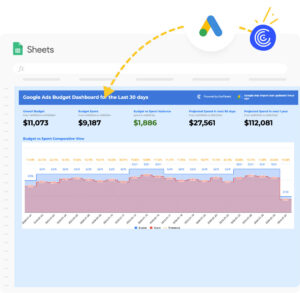
Many businesses rush to scale Google Ads & AdWords too early. They see a few leads come in and immediately raise the budget. That often backfires.
Before increasing spend, the account needs stability. Conversion tracking must be accurate. Cost per lead should stay within a predictable range. Search terms should be reviewed and cleaned regularly. Without these safeguards, scaling only magnifies inefficiency.
A controlled account grows slowly but confidently. An uncontrolled account grows fast and collapses just as quickly.
The Metrics That Reveal Wasted Spend
Looking at surface-level numbers like clicks or impressions doesn’t tell the full story. Google Ads & AdWords success depends on understanding the right metrics.
| Metric | What It Reveals |
|---|---|
| Search terms | Which clicks help or hurt |
| Cost per conversion | True efficiency |
| Conversion rate | Traffic quality |
| Impression share | Missed opportunity |
Comparing your results against reliable Google Ads benchmark data helps identify whether high costs are caused by competition or wasted spend.
These numbers show where to tighten targeting, where to pause spend, and where growth makes sense.

Negative Keywords: The Simplest Cost-Saving Tool
Negative keywords are one of the most powerful features inside Google Ads & AdWords, yet they are often ignored. They tell Google which searches you do not want to pay for.
Without negatives, ads appear for irrelevant searches that drain the budget. With negatives, spend is protected and intent improves. Even adding a short list of negatives can reduce waste quickly.
Local and service-based businesses see especially strong results from consistent negative keyword work. This is why SEM strategy is often paired with local visibility efforts like the ones outlined here:
https://nesacemedia.com/boost-local-visibility-with-sem-services-nesace-media/
Writing Ads That Filter Instead of Attract Everyone
Many ads are written to sound appealing to as many people as possible. That approach invites low-quality clicks.
Strong Google Ads & AdWords copy does something different. It sets expectations. It signals who the service is for and who it is not for. Price hints, service boundaries, and location references help reduce wasted clicks before they happen.
When ads filter correctly, fewer people click, but more people convert. That shift lowers costs over time.
Why Landing Pages Directly Affect Ad Costs
Sending paid traffic to a homepage is one of the fastest ways to increase waste. Homepages are designed for exploration, not conversion.
A good landing page focuses on one action. It matches the keyword and ad message exactly. It loads quickly and removes distractions. When users find what they expected, they stay longer and convert more often.
Poor landing pages increase bounce rates. High bounce rates signal low relevance to Google, which pushes costs up. Improving landing pages is often easier than lowering bids.
If your site needs improvement, these WordPress design basics are a helpful starting point:
https://nesacemedia.com/top-wordpress-web-design-best-practices/
Google Ads & AdWords for Small Businesses
Small budgets don’t mean small results. Google Ads & AdWords can work very well for small businesses when campaigns are tightly focused.
The key is restraint. Instead of targeting dozens of keywords, small accounts perform better by focusing on high-intent searches. Service areas should be limited. Display campaigns should be avoided early. Every dollar should be accountable.
Many Oregon-based businesses use this approach to compete against larger brands without matching their spend.
Automation: When It Helps and When It Hurts
Automation tools inside Google Ads & AdWords can save time, but they are not magic. They rely on data. When data is clean and consistent, automation can help optimize bids and placements.
When data is thin or inaccurate, automation makes poor decisions faster. In early-stage accounts, manual control often produces better results. Automation works best after patterns are proven.
Scaling Google Ads & AdWords Without Losing Control
Scaling doesn’t mean increasing the daily budget overnight. That approach often introduces instability.
Smart scaling focuses on what already works. Winning keywords are expanded. Impression share is increased on top performers. Proven campaigns are duplicated instead of reinvented. These steps maintain efficiency while increasing volume.
Scaling should feel steady. If it feels chaotic, something is wrong.
DIY Management vs Professional Help
Managing Google Ads & AdWords requires time, attention, and regular review. Some businesses manage this well in-house, especially at lower spend levels.
As budgets grow, complexity increases. Search terms multiply. Performance shifts faster. Missed issues become more expensive. At that point, professional management often pays for itself.
If you’re evaluating agencies, this guide explains what to look for:
https://nesacemedia.com/top-digital-marketing-agency-12-criteria-that-matter/
Key Takeaways
? Google Ads & AdWords works best with control, not guesswork
? Reducing waste often matters more than increasing spend
? Structure and relevance lower costs over time
? Scaling should be based on proof, not hope
Frequently Asked Questions
Why does Google Ads & AdWords spend money so fast?
Loose targeting and missing negative keywords are the most common causes.
Can I stop campaigns instantly if needed?
Yes. You can pause ads at any time.
Is Google Ads & AdWords good for service businesses?
Yes, especially when targeting high-intent local searches.
Do landing pages really matter that much?
Yes. They directly influence conversion rates and ad costs.
Conclusion: Spend With Intention, Not Emotion
Google Ads & AdWords doesn’t need to feel risky or unpredictable. When campaigns are built with clear intent, strong structure, and consistent review, paid search becomes one of the most dependable growth channels available.
If you want help reducing wasted spend, tightening targeting, and building a campaign you can trust, Nesace Media is ready to help.
? https://nesacemedia.com/contact-us
Additional Resources

Written by Titonian Wallace Sr.
Founder of Nesace Media based in Hillsboro, Oregon. Specializing in custom native WordPress web engineering and strategic digital marketing engines.